Project: Data Modeling with Postgres
Introduction
Startup team Sparkify wants to analyze data on a new music streaming app. The team particularly interested in understanding of what songs its app users listening to. Currently data resides in a directory of JSON logs on user activity on the app and directory with JSON metadata on the songs in their app. There is no ETL pipeline that would extract data for analysis purposes.
The task for a data engineer is to create a Postgres database with tables designed to optimize queries on song play analysis. Data engineers role is to create a database schema and ETL pipeline for their analysis.
Project description
Task: 1) define fact and dimension tables for a star schema for a particular analytic focus 2) write ETL pipleline that transfer data from files in two local directories into these tables in Postgres using Python and SQL
Song Dataset
Sparkify team has an access to subset of a real data from Million Song Dataset. Each file is in JSON format with metadata about a song and the artist of that song.
Below is our filepath for our two files in the dataset: song_data/A/B/C/TRABCEI128F424C983.json song_data/A/A/B/TRAABJL12903CDCF1A.json
Below is an example of what a single song file in JSON format look like: {“num_songs”: 1, “artist_id”: “ARJIE2Y1187B994AB7”, “artist_latitude”: null, “artist_longitude”: null, “artist_location”: “”, “artist_name”: “Line Renaud”, “song_id”: “SOUPIRU12A6D4FA1E1”, “title”: “Der Kleine Dompfaff”, “duration”: 152.92036, “year”: 0}
Log Dataset
Second dataset is a log file in JSON format generated by the even simulator based on the songs in the dataset above. Those log files are partitioned by the year and month and filepath for those two files are:
log_data/2018/11/2018-11-12-events.json
log_data/2018/11/2018-11-13-events.json

Files
In addition to the data files, the project includes six files:
- test.ipynb - this file lets us check our database after running SQL queries and python scripts
- create_tables.py- used to drop and create tables that resets tables before we run ETL scripts
- etl.ipynb - reads and processes a single file from song_data and log_data and loads the data into tables created in sql_queries.py file.
- elt.py- reads and processes files from song_data and log_data and loads them into tables.
- sql_queries.py- contains all SQL queries and is imported into the etl.py, etl.ipynb and test.ipynb files
- README.md provides discussion of the project
Step 3: Define the Data Model
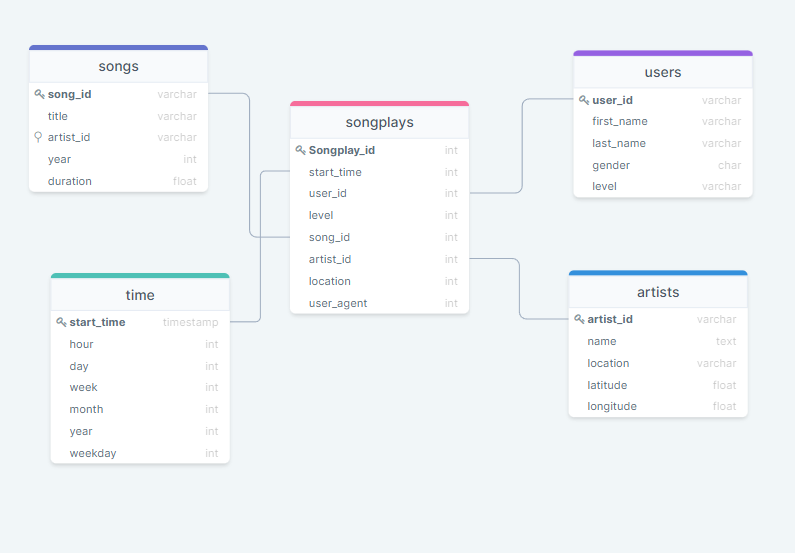
Database Schema for Song Play Analysis
Using the song and log dataset, star schema optimized for fast aggregations and to run simple queries to perform analysis on songplays.
Schema includes:
Fact table:
- Songplays
Dimensions:
- songs
- users
- artists
- time
ETL Pipeline
Extract, transform, load(ETL) is the general procedure tha copies data from one or multiple sources into a destination system whick represents data differently from, or in a different context than, the sources.
Extracting and transforming data
ETL pipeline first extarcts data from below two sources: /data/log_data and /data/song_data.
Then it transforms and loads the data into into tables (pls refer to schema table above) of the sparkifydb database. This is handled by below three files using Python and SQL:
- create_tables.py- used to drop and create tables that resets tables before we run ETL scripts
- elt.py- reads and processes files from song_data and log_data and loads them into tables.
- sql_queries.py- contains all SQL queries and is imported into the etl.py, etl.ipynb and test.ipynb files
Using test.ipynb, we can check the result of ETL process.
The steps to run the pipeline are as follows:
- In a terminal, run create_tables.py file to reset the tables in the sparkifydb database.
- Running test.ipynb jupyter notebook confirms that the tables were successfully created with the correct columns.
- in a terminal, run etl.py to process all dataset
- In Jupyter environment, run test.ipynb to confirm that the records were successfully inserted into each table.